7 Module 7: Data Analysis and Experimental Design
7.1 Background
Students now use sequence data generated earlier in the course to compare isolates with Delftia acidovorans SPH-1 and other related genomes. The goal is to identify genetic features that explain the observed phenotype.
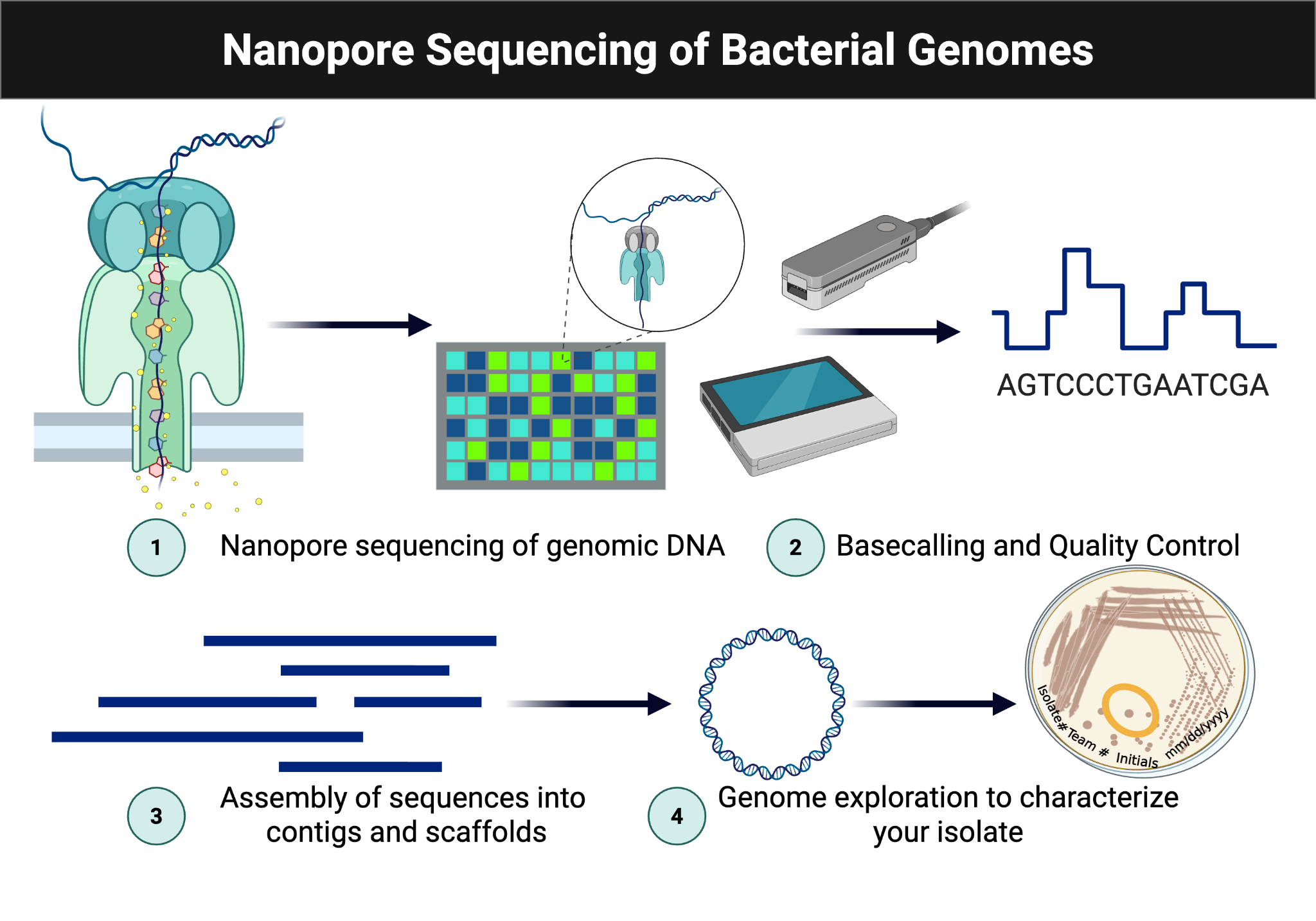
Figure Figure 7.1 is reused from the sequencing workflow to anchor where assembly, annotation, and comparative analysis fit into the broader pipeline.
7.2 Criteria for Success
Successful completion requires use of BV-BRC and SeqHub, careful documentation of outputs, and a complete ELN entry.
7.3 Learning Outcomes
- List safety considerations for extracting DNA from microbial isolates. (CO 3, 4, 5) 🥼
- Explain the purpose of the bioinformatics tools and workflows used. (CO 3, 4, 5) 🥼
- Discuss the significance of genome assembly. (CO 3, 4, 5) 🥼
- Practice using web-based bioinformatics tools. (CO 3, 4, 5) 🥼
- Practice exploring genome assemblies and gene annotations. (CO 3, 4, 5) 🥼
- Describe the workflow for assembly of microbial genomes. (CO 2, 3, 8,9) 📁
- Collect data from genome sequencing. (CO 6, 8) 📈
- Interpret genomic data in the context of phenotypic analyses. (CO 6, 7,8) 📈
- Revise the draft for your individual and group projects. (CO 3, 9) 🏅
- Analyze how this experiment contributes to your overall experimental goal. (CO 1) 🤔
7.4 Skills and Knowledge
Completing this module will help you develop and practice the following skills and knowledge, which you can include in your curriculum vitae.
Skills: This module helps you practice the following essential skills for molecular biologists using sequencing technologies. You will learn to analyze sequence data using several tools. After completing this lab, you will gain the following lab skills:
- Sequence read quality control (trimming/filtering) for long and short reads
- Microbial genome assembly
- Genome annotation and exploration
Knowledge: This module will also help you become familiar with the following important content in microbial genomics lab settings:
- Understanding the steps required to assemble a microbial genome
- Familiarity with tools for read trimming/filtering, assembly, annotation, and metabolic modeling
- Understanding of cloud-based bioinformatics tool submission process
7.5 Procedures
7.5.1 Lab Safety
This is a bioinformatics lab.
7.5.2 Methods: Data Analysis
- Create a free BV-BRC.org account. Share your username with your instructors: BV-BRC Usernames.
- Access the sequences in our shared BV-BRC workspace.
- Obtain concatenated sequences for your isolate from the shared workspace.
- Follow the Comprehensive Genome Analysis Service tutorial: Comprehensive Genome Analysis (CGA) Service | BV-BRC.
- Start a job to assemble and annotate your genome by:
Indicating the file(s) for your long-read Nanopore sequences (single read). If available, include the Nanopore data from each run.
Indicate the files for your paired Illumina sequences (paired reads). There should be R1 and R2 files for your isolate.
Leave the assembly parameters on auto.
- Create an output folder in your BV-BRC workspace. Label the folder with your isolate’s name.
- Submit the job on bv-brc.org.
- Wait… ~30 min to overnight, depending on server load and data used for assembly.
- Create a free SeqHub account.
- Upload the assembled genome FASTA file from BV-BRC.org Comprehensive Genome Analysis Service to annotate and explore in SeqHub.
7.5.3 Methods: Genome Comparisons
- Use BV-BRC to compare your genome to others in the database. For this, use the Similar Genome Finder tool. Review the tutorial for this workflow.
- Select your isolate’s genome.
- Run the workflow and compare results using Reference and Representative Genomes and all Public Genomes.
- Save your results and pie chart images.
- Record the similar genomes you identified:
Replace the note with your identified genomes.
- Use the Genome Alignment tool to compare your isolate’s genome to one or more similar genomes you identified in the previous step. Review the tutorial for this tool.
7.5.4 Methods: Annotation Review and Genome Exploration
- Use the results from the BV-BRC Comprehensive Genome Analysis service to review the annotation results.
- Select the annotation report and review the findings.
- Record the number of coding sequences (CDS) and other features found for your discussion.
- Record the top functional assignments of the genes identified.
What metabolic properties are most abundant? Record for your Discussion section.
How do these findings relate to your Biolog GEN III phenotypic data? Record for your Discussion section.
- Review the CGA report and note whether plasmids or antibiotic resistance genes were identified.
7.5.5 Methods: Genome Exploration with SeqHub
- Create a free SeqHub account.
- Review the features of this tool: Documentation & Video (7 min).
- Find the FASTA file for your genome in BV-BRC and download it.
- Upload the FASTA file to SeqHub.
- Explore the genome considering:
Low-confidence annotations. What are they? Are they novel genes?
Hypothetical genes. What could they do? Are they similar to other sequences?
Predicted Protein Interactions (PPI) tool. Are there protein interactions that are intriguing and could support your research question?
AI Agent. What questions can you ask the agent to learn about the genomic potential of your isolate?
Protein Folding. Are there proteins of interest that could be folded?
- Use the (AI) agent to help you understand and search for genes.
- Which genes of interest did you identify? Why are they intriguing? Keep these answers in mind when writing your discussion section.
7.6 Data/ Results
Include any tables, figures, images that you’ve generated from your data:
Replace the note with your results; add images if applicable.
7.7 Result Analysis
Explain how your isolate differs from the SPH-1 reference, how well the genomic data matches the phenotype, and what the assembly metrics suggest about data quality.
Replace the note with your result analysis.
7.8 Discussion
How did BV-BRC assemble your genome? How “good” was your assembly? Hint: review the Assembly results folder from BV-BRC and note the number of contigs, their sizes, and any other relevant information.
What factors can affect the quality of the assembled genome? Compared to other isolates sequenced, is your genome larger?
Apart from research, what other applications are there for gene prediction and annotation?
What can the Predicted Protein Interactions (PPI) network contribute to your research?
Identify at least one change made to the lab protocol, whether intentional or accidental (e.g., wrong amount of reagent used, contamination, etc). How did, or could, this change/accident impact your final results?
Replace the note with your discussion.