4 Module 4: Microbial Metabolism: Biolog GEN III Characterization of Strains
4.1 Background
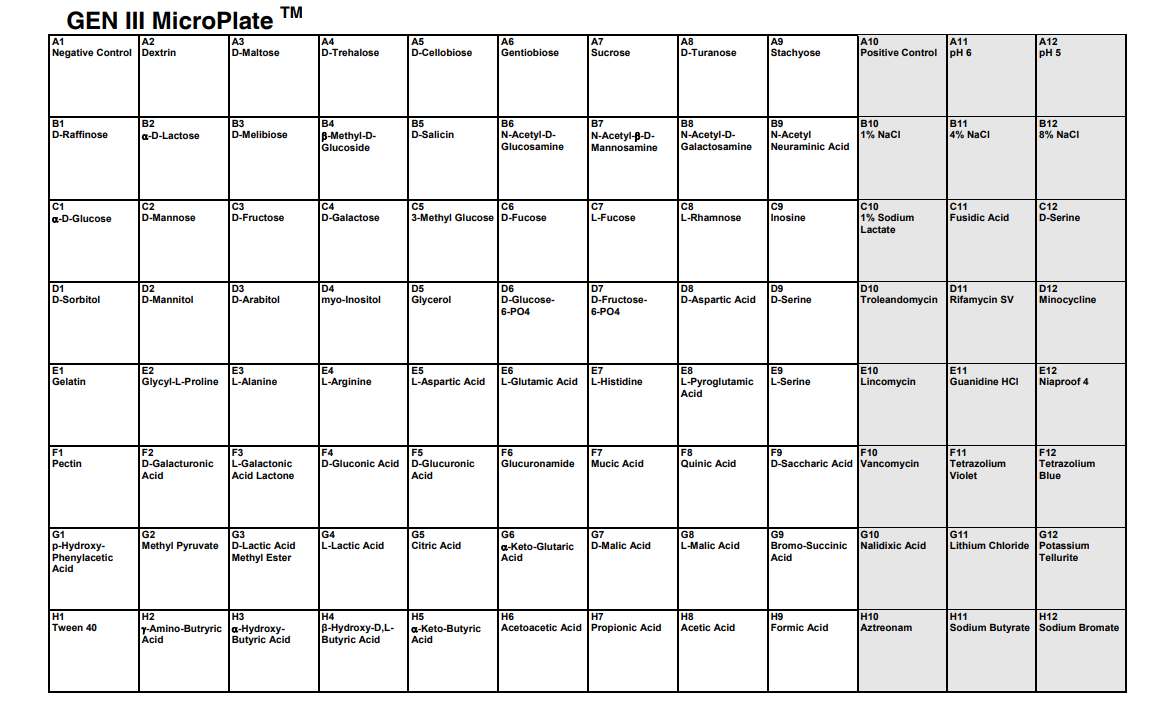
Biolog Blood Universal Growth agar and GEN III MicroPlates make it possible to test bacterial growth across many environmental and chemical conditions at once. The plate uses metabolic dye chemistry to report growth and biochemical activity across up to 94 tests.
Figure Figure 4.1 shows the overall GEN III plate layout used to interpret the phenotypic results.
4.2 Criteria for Success
Complete the in-lab assay setup, collect analyzable data, and finish the ELN entry with observations and interpretation.
4.3 Learning Outcomes
- List safety considerations for propagating microbes. (CO 3, 4, 5) 🥼
- Explain the purpose of GEN III Biolog plates and metabolic tests (CO 3, 4, 5) 🥼
- Describe the features of biofilms. (CO 5) 🥼
- Discuss the significance of growth curves. (CO 3, 4, 5) 🥼
- Practice using a multichannel. (CO 3, 4, 5) 🥼
- Practice using a turbidimeter to adjust the turbidity in the inoculating fluid to a desired value. (CO 3, 4, 5) 🥼
- Practice consistently seeding 96-well plates without contamination. (CO 3, 4, 5) 🥼
- Describe the purpose, methods, and preliminary results of your GEN III phenotypic characterization experiments. (CO 3, 8, 2,9) 📁
- Collect growth data. (CO 6, 8) 📈
- Interpret growth data from Biolog GEN III plates. (CO 8, 6,7) 📈
- Create a draft for your individual and group projects. (CO 3, 9) 🏅
- Analyze how this experiment contributes to your overall experimental goal. (CO 1) 🤔
4.4 Skills and Knowledge
Completing this module will help you develop and practice the following skills and knowledge, which you can include in your curriculum vitae.
Skills: This module helps you practice the following essential skills for safe and effective lab work with microbial isolates. Additionally, you will learn to generate, visualize, and analyze bacterial growth curves. After completing this lab, you will gain the following lab skills:
- Lab safety and proper personal protective equipment (PPE)
- Proper use of Biolog plates and multichannel pipettors
- Proper use of a turbidimeter to adjust bacterial densities
- Analysis of growth data of bacteria in 96-well plates
Knowledge: This module will also help you become familiar with the following important content in microbial genomics lab settings:
- Understanding PPE requirements for microbial work.
- Familiarity with phenotypic assays and growth assessment.
- Seeding of 96-well plates for bacterial growth.
4.5 Procedures
4.5.1 Lab Safety
4.5.1.1 Before Lab
- Wear the correct PPE (lab coat, goggles, and gloves).
- Wipe the lab bench with 70% ethanol.
- Before working with microorganisms, carefully wipe pipettors with 70% ethanol.
4.5.1.2 During Lab
- Treat all tips as potential biohazards.
- Remove your PPE if you are leaving the lab (water/bio break).
- Discard samples and disposable lab items in the correct trash bins.
- Try to keep personal items (computers, phones, etc.) usage to a minimum.
4.5.1.3 After Lab
- Wipe your station with 70% alcohol.
- If you touched any personal items during the lab, wipe them with 70% ethanol before leaving.
- Dispose of gloves in the main biohazard waste container.
- Dispose of used petri dishes in the biohazard bin.
- All liquids containing bacteria must be poured into a beaker for bleach decontamination (can be found on the blue bench paper by this sink labeled “liquid”).
- Glass tubes can be placed into a beaker (on the blue bench paper by this sink, labeled “glass”).
- All bacterial growth plates can be thrown away in the biohazard trash.
- Return all reusable materials to our storage drawers.
- Wipe down all surfaces with ethanol.
- Remove PPE.
- Wash your hands.
4.5.2 Methods: Turbidimeter
We will swab bacterial cells from your agar plates (BUG Agar: BUG (Biolog Universal Growth) Agar w/ 5% sheep blood), dilute in Biolog IF-A inoculation fluid, and check turbidity with a turbidimeter.
Each student researcher pair will need:
- IF-A inoculating fluid
- BUG agar plate with bacteria (incubated overnight at 33°C from your TSA plates)
- Biolog GEN3 plate
- One 200/300 μl multichannel micropipette (p200)
- Micropipette tips for p200
- Wipes
- Tip disposal container
- Calibrate the turbidimeter to a “blank” sample of inoculation fluid in a tube
Using the Biolog Turbidimeter, blank the turbidimeter with a clean tube (wiped clean of dirt and fingerprints) containing uninoculated IF-A. Because the tubes used are not optically uniform, they should be blanked individually.
Set the 100% transmittance adjustment knob so that the meter reads 100%.
Record the reading.
- Use a turbidimeter with a bacterial sample in the inoculation fluid in a tube
Collect bacteria from your streak plate by touching the Inoculatorz™ swab to the bacteria (be gentle: do not push the swab through the agar media).
Open your Inoculating Fluid (IF) tube and submerge the swab in the liquid. Swirl the swab around in the fluid for 15 seconds to ensure inoculation. Do not leave the liquid uncapped longer than necessary to prevent contamination. The tubes are glass: work carefully.
Cap the tube and gently invert it three (3) times to ensure thorough mixing (no bubbles).
The target cell density for our protocol is 95%T.
Add more bacteria with the swab, if necessary, to get as close to this value as possible by continuing to add bacteria to the tube. Work carefully and keep the tube capped. If necessary, use another swab if you think it has touched another surface.
- Once you’ve reached the target cell density at 95%T, cap the tube and proceed to the next Activity.
4.5.3 Methods: Biolog Plate Preparation
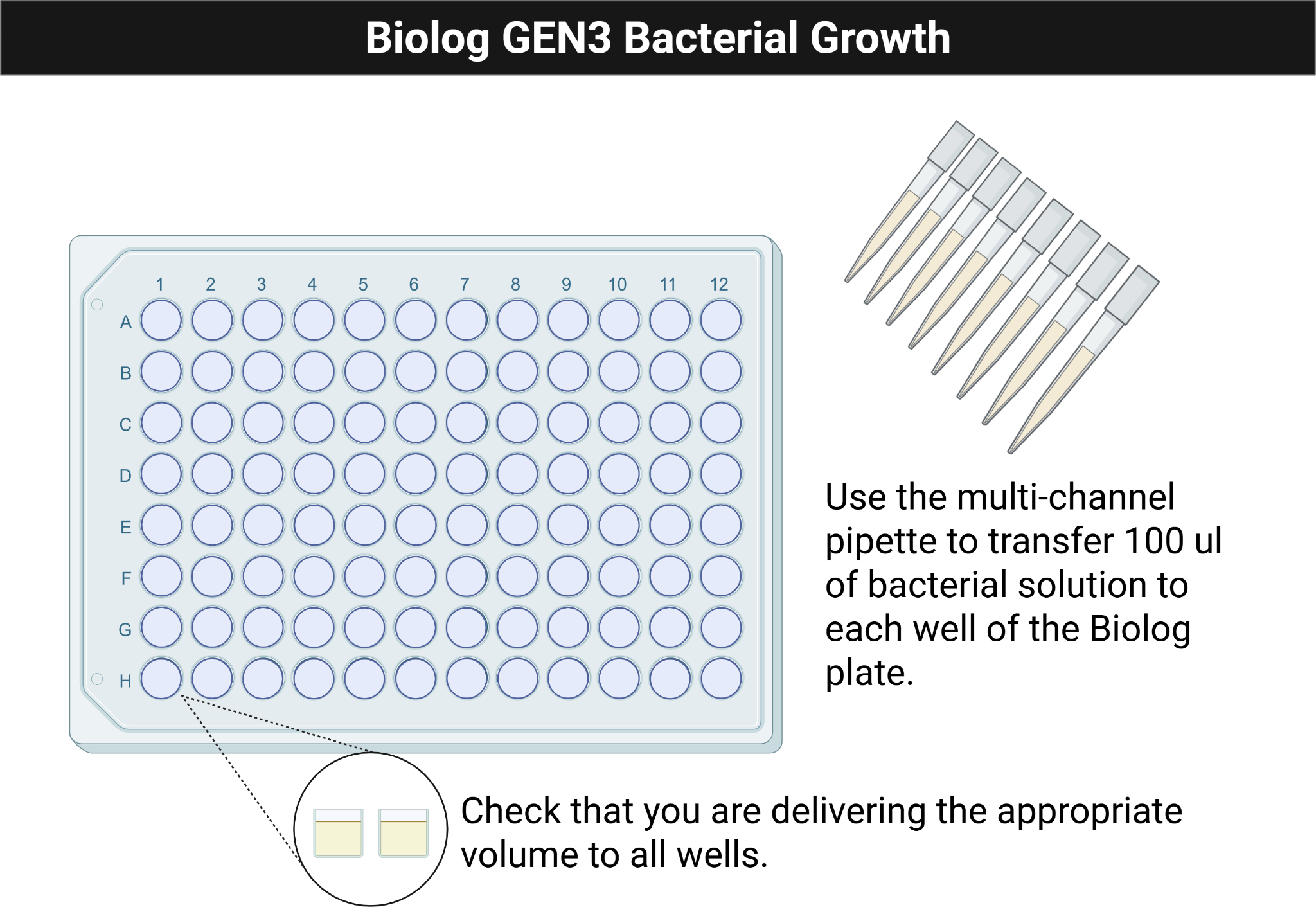
Figure Figure 4.2 shows the multichannel loading pattern used to inoculate each column consistently.
- Pour the cell suspension into the multichannel pipette reservoir.
- Load 8 tips onto each gasket of the multichannel pipette and fill the tips by drawing up 100 μl of cell suspension from the reservoir.
- Use the multichannel to add 100 μl of diluted bacterial culture to each of the 96 wells of the GEN III MicroPlateTM.
- If the tips touch the wells, replace your tips before delivering inoculation fluid to the next column. Work carefully to avoid contamination!
- Use the technique practiced in Activity 1.
- Eject the pipettor tips if any tip touches the wells of the plate, as this can cause cross-contamination between wells. Reload tips as needed.
- Check that all wells have liquid
- Cover the GEN III microplate with its lid and eject the pipette tips.
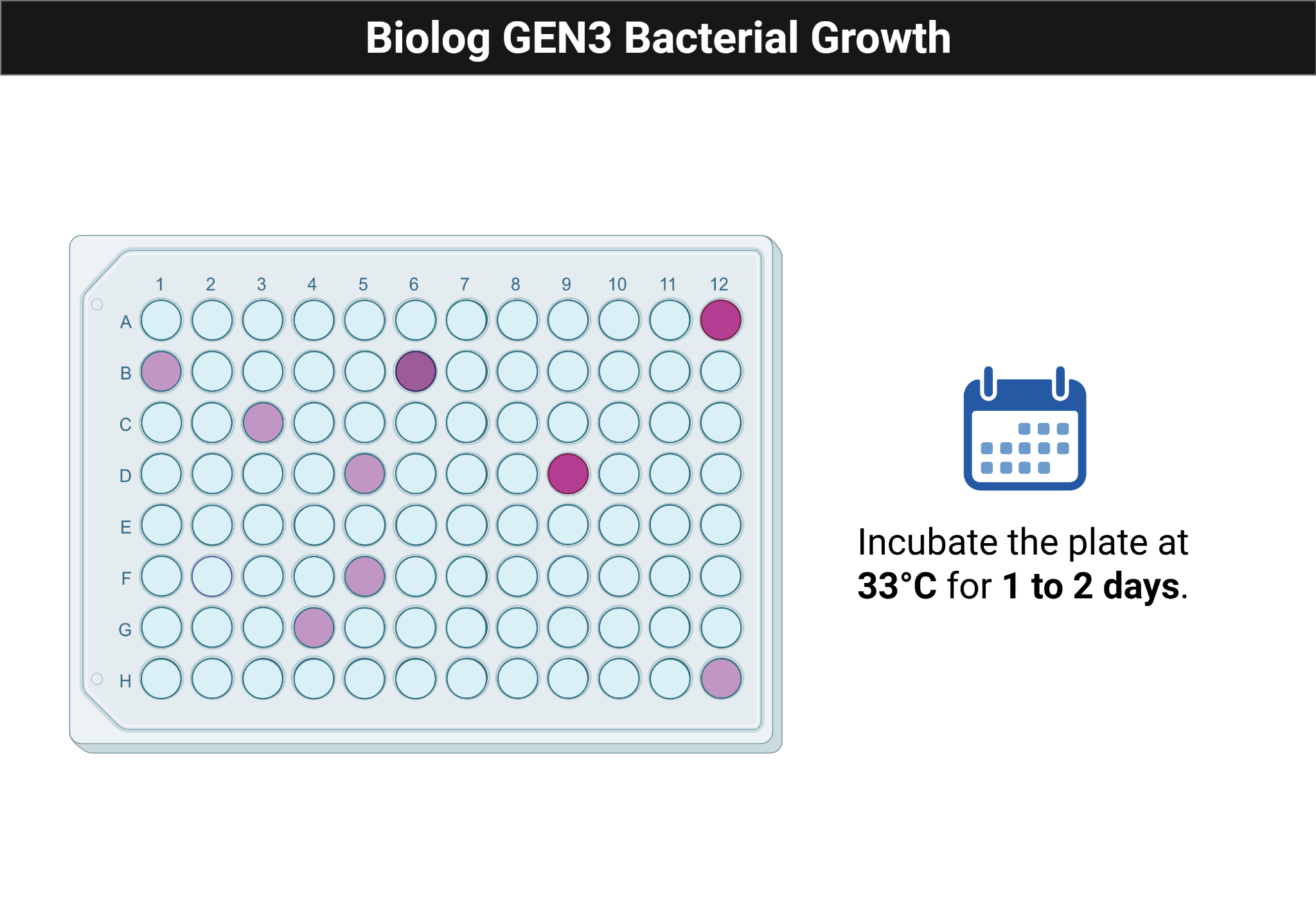
- Incubate at 33°C for 1-2 days. We will incubate four plates in a heated Agilent Biotek LogPhase 600 plate reader and take 600 nm readings every 15 minutes for 2 days to examine growth patterns.
- Your second plate will be incubated statically at 33°C for 1-2 days
Figure Figure 4.3 shows the expected appearance of an inoculated Biolog plate after incubation.
If using Breathe-Easy film, follow the video:
4.6 Data/ Results
4.6.1 Growth Curves
- Save your raw data and share it with your group. The spreadsheet includes readings at every time point for your plate.
- Export the Blank 600 table as a .csv file and ensure it contains:
- A Time column
- Well columns labeled A1 through H12
- No metadata rows above the table
- Upload the .csv file to your respective Lab folder in your repository. You may use the code from Lab-3 to create graphs of your data; alternatively, your team can use Excel or any other data analysis methods to:
- Validate the dataset structure
- Plot growth curves for all wells and isolates
- Compare growth curves among wells
Replace the note with your results; add images if applicable.
4.7 Result Analysis
Write an analysis of your results; explain what these results mean, and if this matches what was expected. Evaluate and analyze your results. What wells presented a color change, and what carbon source was found on each of these wells? What does this tell you about your bacteria? Were there any wells in your Biolog plate that did not have any growth? What are some of the reasons for this? Ask yourself some of these questions when you receive your bacterial growth rate results!
Replace the note with your result analysis.
4.8 Discussion
What are some advantages and disadvantages of using a multichannel pipette?
During the inoculation, describe how you ensure that you isolate a “pure culture.” Why is a “pure culture” needed for this assay?
What is a turbidimeter, and why would measuring turbidity be important for this assay?
Why do we need to use bacteria grown on BUG plates rather than TSA plates?
How has your use of multichannels changed over the course of the semester? Why?
Replace the note with your discussion.